
Adobe Express
Try Adobe Express as an easy-to-use design platform for creating professional marketing materials without the complexity of advanced graphic design software.

Adobe Express is an all-in-one, user-friendly design app for creating social media graphics, flyers, presentations and more. Its quick actions, such as background removal, and thousands of templates, fonts and design assets make it easy to produce professional-looking content. Adobe Express also integrates with other Adobe tools and offers features that work across platforms.
UIS Brand Integration
UIS users have access to a shared library of brand assets, including approved logos, colors and fonts, to help create materials that follow university brand standards.
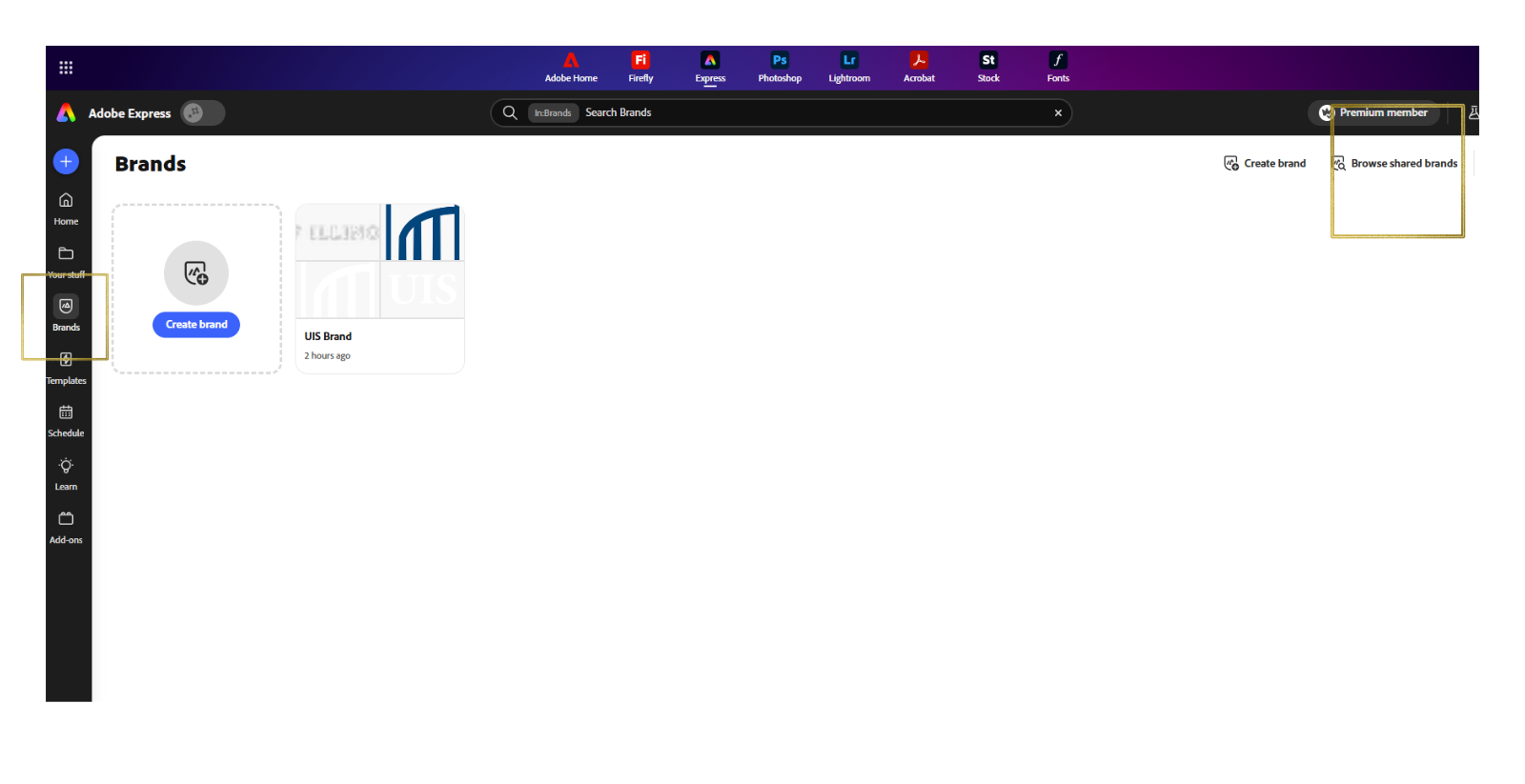
To access the UIS Brand library in Adobe Express:
- Select Brands in the left navigation.
- Select Browse Shared Brands in the upper-right corner.
- Select UIS Brand.
FAQs
Who is it for?
+
UIS faculty and staff who need to create professional-looking marketing materials without the complexity of advanced design software within Adobe Creative Cloud, such as Photoshop or Illustrator.
Graduate assistants and student workers may also qualify for the university's Adobe Creative Cloud staff offer through WebStore. Check with the WebStore for eligibility before purchasing an individual Adobe license.
What is the cost?
+
Adobe Express is included with Adobe Creative Cloud access. UIS faculty and staff can access the university's available Adobe Creative Cloud staff offer through the WebStore. As noted above, graduate assistants and student workers should confirm with the WebStore if they qualify for the university's Adobe Creative Cloud staff offer.
How do I access Adobe Express?
+
UIS faculty and staff can access Adobe Express through their university Adobe Creative Cloud subscription.
If you already have an active subscription, log in to Adobe using your university credentials and select the Adobe Express icon. If you do not have access yet, visit the University of Illinois WebStore to access the Adobe Creative Cloud for University Staff Enterprise Access offer.
Graduate assistants and student workers should also check the WebStore for eligibility under the university staff offer before purchasing another Adobe product.
If you experience difficulty accessing Adobe Express or other Creative Cloud applications after completing the WebStore process, contact the UIS Help Desk for assistance.
Are Adobe Creative Cloud and Adobe Acrobat Studio the same?
+
No. Adobe Creative Cloud and Adobe Acrobat Studio are two separate products. Both provide access to Adobe Express, but they are not interchangeable.
Graduate assistants and student workers should first check WebStore for the Adobe Creative Cloud staff offer. Adobe Acrobat Studio does not currently have a free purchase option for faculty, staff or students.
Contact the UIS Help Desk before purchasing another Adobe product to confirm available access options.
What technology supports Adobe Express?
+
Adobe Express is accessible via web browser and mobile apps (iOS/Android).